
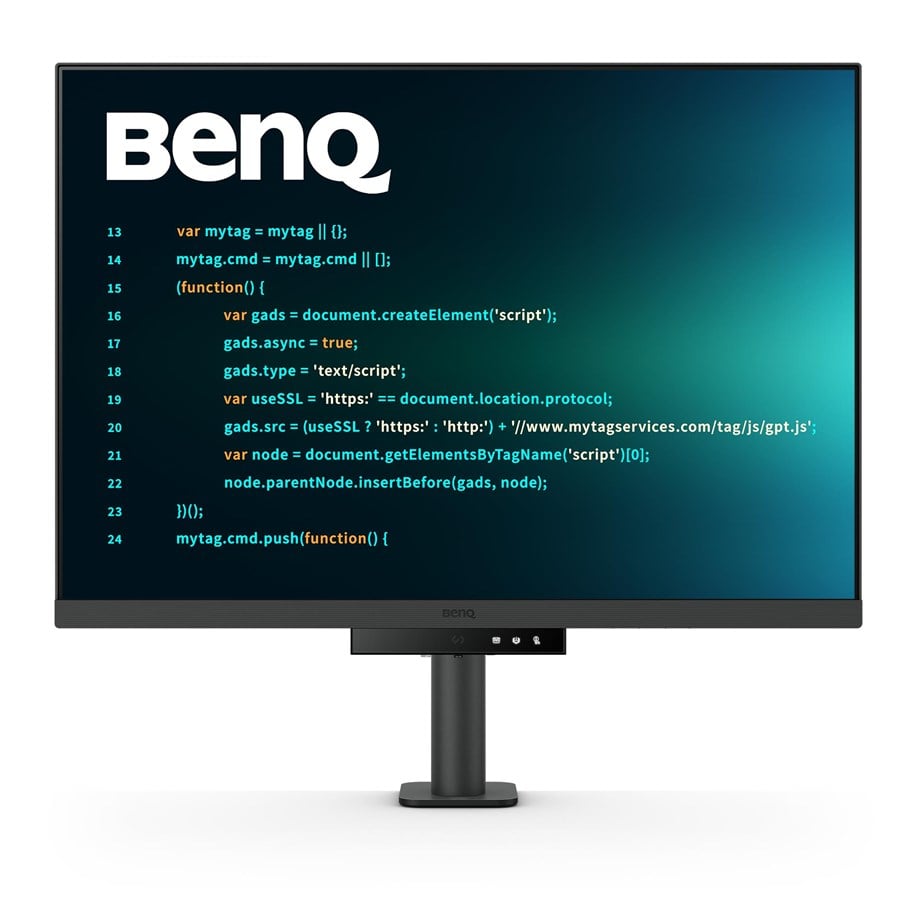
Varenummer: 3303409
28" BenQ RD280UA computer monitor 71.6 cm (28.2") 3840 x 2560 pixels 4K Ultra HD Black
BenQ RD280UA PC-skjerm 71,6 cm (28.2") 3840 x 2560 piksler 4K Ultra HD Svart


På lager
7 790,00 kr
6 232,00 kr eksl. mva
Gratis frakt (privatkunde)
3 stk. på lager - 1-3 dager til levering
Enheten støtter USB PD hurtiglading.
USB PD


Astonishing Clarity for the Ultimate Coding Experience
Crystal-Clear Coding, Glare-Free Brilliance
Crafted for Programmers: BenQ Programming Monitors offer you full immersion in your code no matter where you are.
Empowering Programmers with BenQ Nano Matte Panel
Enter the coding flow in seconds with the Nano Matte Panel. Featuring a low reflection property to minimize distractions, this advanced technology enhances focus and boosts productivity, delivering unparalleled clarity for peak performance.
Superior Code Differentiation
BenQ's advanced coding modes ensure crystal-clear fonts and improved code differentiation, reducing eye strain during prolonged use.
Code with Comfort and Efficiency
Offer both dark and light themes for adaptable coding environments. Swiftly adjust brightness, sharpness, and contrast for optimal coding conditions.
Experience Focus Anytime with MoonHalo
Experience MoonHalo by BenQ – an illumination system built into the back of the monitor. With customizable color temperature, brightness, and light modes, along with Auto Dimming powered by B.I. Gen2, MoonHalo ensures optimal eye protection and focus anytime, whether you're working from home or the office.
Take Control of Display Settings with Display Pilot 2
The Display Pilot 2 software gives you complete control of your display settings. Users can set their preferred functions with ease, including MoonHalo Control, Shortcuts, Desktop Partition, Application Mode, Software Dimming, Circadian Mode, and more.
Assign Different Modes to Applications
Application Mode makes it easy to assign different color modes and remembers your frequently-used settings for upcoming applications. Bind your IDE with the RD series’ advanced coding modes for the ultimate workflow!
Intelligent Circadian Displays for Comfortable Eyes
BenQ Low Blue Light Plus includes Circadian Mode, which automatically adjusts your screen's color temperature throughout the day, mirroring the natural sunrise to sunset cycle. Enjoy eye comfort worry-free.
Boost Efficiency with Display Pilot 2 Shortcuts
Exclusive Shortcuts allows you to easily bind commonly used functions to the hotkeys. With Display Pilot 2, copying and pasting shortcuts is no longer limited to one set at a time; it conveniently remembers two sets of content at once.
Monitor Ergonomics for Your Comfort
Enhance your coding workspace with the monitor's adjustable height, tilt, pivot, and swivel capabilities for optimal efficiency and comfort.
Optimal Posture, Superior Output
Relieve prolonged neck and body aches. BenQ Programming Monitors prioritize your comfort for long-term projects.
Ergo Arm Stand : Elevating Coders' Desks with Infinite Flexibility
BenQ Ergo Arm enhances flexibility and provides the optimal screen position for a more comfortable and productive user experience.
Endless Horizons, Intuitive Workflows
Whether it's multi-screen integration or single-screen data comparison, a BenQ Programming Monitor meets your multitasking needs.
Achieve More and Scroll Less
With a rare 3:2 ratio design, RD280UA is crafted for coders to provide them with an expansive field of view.
Seamless Connectivity with Easy Plug and Play
BenQ Programming Monitors offer ample port options, including USB Type-C for all-in-one connectivity.
Maximum Efficiency, Multitask with Ease
Maximum efficiency through unified integration with diverse devices and built-in KVM (keyboard, video, mouse) for seamless source switching.
Daisy Chain with the 90W USB Type-C
Multi-Stream Transport Technology allows you to extend screens across multiple displays using the USB Type-C. The 90W USB Type-C carries images, videos, and other data seamlessly plus charges your mobile devices at the same time all with one cable. Please note that Mac® and MacBook® devices only support daisy chaining via Thunderbolt. Daisy chaining is not supported via HDMI or using regular USB ports on any device. Also, you can only connect a single external display using a Mac device with the M1 or M2 chips. For more information about connecting different models of Mac devices to external displays, please refer to the Apple website.
Coding Hotkey and Function Bar
Effortlessly boost productivity with our unique Coding HotKey and Function Bar. With a swift press of the Coding HotKey at the heart of the function bar you can immerse yourself instantly into the coding realm.
Keep Your Eyes Fatigue-Free
Experience unmatched eye comfort during night hours with our Night Hours Protection and advanced Brightness Intelligence Gen2. BenQ Eye-Care Technology is dedicated to enhancing your visual comfort.
Night Hours Protection
Benefit from minimum brightness technology for reduced eye strain and discover enhanced eye protection at night with our Night Hours Protection. Its intelligent ambient light detection and auto-switch capabilities require minimal user intervention, ensuring effortless and consistent eye care.
Brightness Intelligence Gen2
BenQ B.I. Gen2 automatically detects the brightness in your room and adjusts the screen brightness, while also providing the option to manually fine-tune the brightness.
TUV Reflection Free Certified to Ensure Coding with Refreshed Eyes
Being TUV Reflection Free Certificated ensures coding with minimized distractions, fostering a clearer and more efficient development process. Global safety authority TÜV Rheinland also certifies RD280UA's Low Blue Light as truly friendly to the human eye. Eyesafe 2.0 certification ensures that the display reduces blue light while maintaining vivid color.
Produsent
Varenummer
3303409
Model
9H.LM2LJ.TBE
Ean
4718755093302
Til produsentens hjemmeside
Skjermdiagonal
71,6 cm (28.2")
Skjermoppløsning
3840 x 2560 piksler
Naturlig sideforhold
3:2
Berøringsskjerm
Nei
HD-type
4K Ultra HD
Paneltype
IPS
Oppdateringsresponstid
5 ms
Skjermform
Flat
Kontrastforhold
1200:1
Maksimal oppdateringshastighet
60 Hz
Display antall farger
1,07 milliarder farger
LED-baklys
Ja
Skjermlysstyrke (topp)
400 cd/m²
Skjermlysstyrke (typisk)
350 cd/m²
Anti-blendende skjerm
Ja
Synsvinkel, horisontal
178°
Synsvinkel, vertikal
178°
Pikseltetthet
164 ppi
Diagonal skjermstørrelse
72 cm
HDR (High Dynamic Range) støttes
Ja
HDR-teknologi (High Dynamic Range)
DisplayHDR 400, High Dynamic Range 10 (HDR10)
Fargeskalastandard
DCI-P3
Fargespekter
95%
Flimmerfri teknologi
Ja
Low Blue Light-teknologi
Ja
Smartmoduser
ePaper
Innebygde høyttalere
Ja
Innebygd kamera
Nei
Antall høyttalere
2
RMS-rangert strøm/utgangseffekt
4 W
Markedsplassering
Forretning
Produktfarge
Svart
Innebygd USB-hub
Ja
HDMI
Ja
Hodetelefon ut
Ja
USB-hub-versjon
3.2 Gen 1 (3.1 Gen 1)
Antall USB Type B-oppstrømsporter
1
Antall USB Type-A nedstrømsporter
3
Antall USB Type-C nedstrømsporter
1
USB Type-C DisplayPort Alternate Mode
Ja
USB Power Delivery
Ja
USB Power Delivery opp til
90 W
Antall HDMI-porter
1
HDMI-versjon
2.0
Antall DisplayPorts
1
DisplayPort-versjon
1.4
Hodetelefonutganger
1
HDCP
Ja
HDCP-versjon
2.2
VESA-montering
Ja
Kabellåsport
Nei
Høydejustering
Ja
Panelmonterbart grensesnitt
100 x 100 mm
Kan monteres på vegg
Ja
Justerbar høyde (maks)
13 cm
Omdreiningsakse/midtpunkt
Ja
Svingvinkel
0 - 90°
Dreibar
Ja
Dreietapp/dreiemekanisme
-275 - 275°
Vippjustering
Ja
Vippevinkelområde
-5 - 30°
On Screen Display (OSD)
Ja
OSD-språk
Arabisk, Forenklet kinesisk, Tradisjonell kinesisk, Tsjekkisk, Tysk, Nederlandsk, Engelsk, Spansk, Fransk, Ungarsk, Italiensk, Japansk, Koreansk, Polsk, Portugisisk, Rumensk, Russisk, Svensk
Energieffektivitetsklasse (SDR)
G
Energieffektivitetsklasse (HDR)
G
Energiforbruk (SDR) per 1000 timer
29 kWh
Energiforbruk (HDR) per 1000 timer
31 kWh
Strømforbruk (vanlig bruk)
34 W
Strømforbruk (standby)
0,4 W
Strømforbruk (maks.)
205 W
Strømforbruk, av
0,3 W
AC-inngangsspenning
100 - 240 V
Type strømforsyning
Innvendig lys
Energieffektivitetsskala
A til G
Bredde (med stativ)
610,4 mm
Dybde (med stativ)
476 mm
Høyde (med stativ)
602,2 mm
Vekt (med stativ)
11,4 kg
Bredde (uten stativ)
610,4 mm
Dybde (uten stativ)
87,1 mm
Høyde (uten stativ)
427,8 mm
Vekt (uten stativ)
7,5 kg
Hurtigstartsguide
Ja
Forhåndsinstallert programvare
Display Pilot 2
Bærekraftsertifikater
ENERGY STAR, EPEAT Bronze, TCO
Oppdateringsfrekvens
60 Hz
Skjerm
Skjermdiagonal
71,6 cm (28.2")
Skjermoppløsning
3840 x 2560 piksler
Naturlig sideforhold
3:2
Berøringsskjerm
Nei
HD-type
4K Ultra HD
Paneltype
IPS
Oppdateringsresponstid
5 ms
Skjermform
Flat
Kontrastforhold
1200:1
Maksimal oppdateringshastighet
60 Hz
Display antall farger
1,07 milliarder farger
LED-baklys
Ja
Skjermlysstyrke (topp)
400 cd/m²
Skjermlysstyrke (typisk)
350 cd/m²
Anti-blendende skjerm
Ja
Synsvinkel, horisontal
178°
Synsvinkel, vertikal
178°
Pikseltetthet
164 ppi
Diagonal skjermstørrelse
72 cm
HDR (High Dynamic Range) støttes
Ja
HDR-teknologi (High Dynamic Range)
DisplayHDR 400, High Dynamic Range 10 (HDR10)
Fargeskalastandard
DCI-P3
Fargespekter
95%
Ytelse
Flimmerfri teknologi
Ja
Low Blue Light-teknologi
Ja
Smartmoduser
ePaper
Multimedia
Innebygde høyttalere
Ja
Innebygd kamera
Nei
Antall høyttalere
2
RMS-rangert strøm/utgangseffekt
4 W
Design
Markedsplassering
Forretning
Produktfarge
Svart
Tilkoblingsevne
Innebygd USB-hub
Ja
HDMI
Ja
Hodetelefon ut
Ja
USB-hub-versjon
3.2 Gen 1 (3.1 Gen 1)
Antall USB Type B-oppstrømsporter
1
Antall USB Type-A nedstrømsporter
3
Antall USB Type-C nedstrømsporter
1
USB Type-C DisplayPort Alternate Mode
Ja
USB Power Delivery
Ja
USB Power Delivery opp til
90 W
Antall HDMI-porter
1
HDMI-versjon
2.0
Antall DisplayPorts
1
DisplayPort-versjon
1.4
Hodetelefonutganger
1
HDCP
Ja
HDCP-versjon
2.2
Ergonomi
VESA-montering
Ja
Kabellåsport
Nei
Høydejustering
Ja
Panelmonterbart grensesnitt
100 x 100 mm
Kan monteres på vegg
Ja
Justerbar høyde (maks)
13 cm
Omdreiningsakse/midtpunkt
Ja
Svingvinkel
0 - 90°
Dreibar
Ja
Dreietapp/dreiemekanisme
-275 - 275°
Vippjustering
Ja
Vippevinkelområde
-5 - 30°
On Screen Display (OSD)
Ja
OSD-språk
Arabisk, Forenklet kinesisk, Tradisjonell kinesisk, Tsjekkisk, Tysk, Nederlandsk, Engelsk, Spansk, Fransk, Ungarsk, Italiensk, Japansk, Koreansk, Polsk, Portugisisk, Rumensk, Russisk, Svensk
Energihåndtering
Energieffektivitetsklasse (SDR)
G
Energieffektivitetsklasse (HDR)
G
Energiforbruk (SDR) per 1000 timer
29 kWh
Energiforbruk (HDR) per 1000 timer
31 kWh
Strømforbruk (vanlig bruk)
34 W
Strømforbruk (standby)
0,4 W
Strømforbruk (maks.)
205 W
Strømforbruk, av
0,3 W
AC-inngangsspenning
100 - 240 V
Type strømforsyning
Innvendig lys
Energieffektivitetsskala
A til G
Vekt og dimensjoner
Bredde (med stativ)
610,4 mm
Dybde (med stativ)
476 mm
Høyde (med stativ)
602,2 mm
Vekt (med stativ)
11,4 kg
Bredde (uten stativ)
610,4 mm
Dybde (uten stativ)
87,1 mm
Høyde (uten stativ)
427,8 mm
Vekt (uten stativ)
7,5 kg
Emballasjeinnhold
Hurtigstartsguide
Ja
Forhåndsinstallert programvare
Display Pilot 2
Bærekraft
Bærekraftsertifikater
ENERGY STAR, EPEAT Bronze, TCO
Tekniske detaljer
Oppdateringsfrekvens
60 Hz
Ovenstående informasjon/spesifikasjoner er veiledende og kan uten varsel bli endret av produsenten. Det tas forbehold om trykkfeil og illustrerende bilder. Enkelte tekster kan være autogenerert eller maskinoversatt, så derfor kan det forekomme tekster som virker misvisende.